Build an Advanced Canvas App in 5 Days
Without spending months watching YouTube
Still Stuck Building Basic Apps?
Maybe these sound familiar:
- You can build basic apps, but once things get complex, you can’t seem to get things working.
- Your apps feel slow, don’t work great, and don’t look good.
- Frustrated that nothing is working and you don't have much support.
Stop doing ALL your Learning on YouTube and Blogs
Most new Canvas App makers try to learn everything all on their own
Without proper guidance on how to ACTUALLY build a good Canvas application.
Most newer app makers spend months or years learning this tool before they can actually build a decent app and feel confident in their skills.
The truth?
You can start building complex apps - NOW
The Advanced App Challenge
Build an Advanced Canvas App in just 5 Days
The perfect way to stop building basic apps that break
And to start building beautiful, fast, complex apps that actually work
Inside this LIVE 5-day challenge...
You will supercharge your Canvas apps skills as you build, share, and publish an advanced Canvas application.
- without taking you months to get there.
By the end, you'll have an advanced app that you're proud of
and the confidence to keep building more.
You can learn the foundations of building complex, advanced apps WITHOUT:
- Taking you months to get there
- Spending hours watching YouTube videos/reading blogs
- Making dozens of mistakes you could've avoided
- Building multiple bad habits you'll regret later
I mention these because I did ALL OF THESE THINGS.
You don't have to.
There's a better way.
DATE: Monday, April 27th - Friday May 1st
Join the Challenge NowIn Just 5 Days, Here's What You'll Learn:
Day 1 - Designing and Structuring Beautiful Apps
Design and structure your app to be more responsive. Integrate design tricks and tips, including an advanced, collapsable menu component.
Day 2 - Integrating Complex Filters and Data Displays
Create complex data "views", including nested galleries and multiple advanced filters - all while learning how to finally understand and deal with delegation.
Day 3 - Building Advanced Form
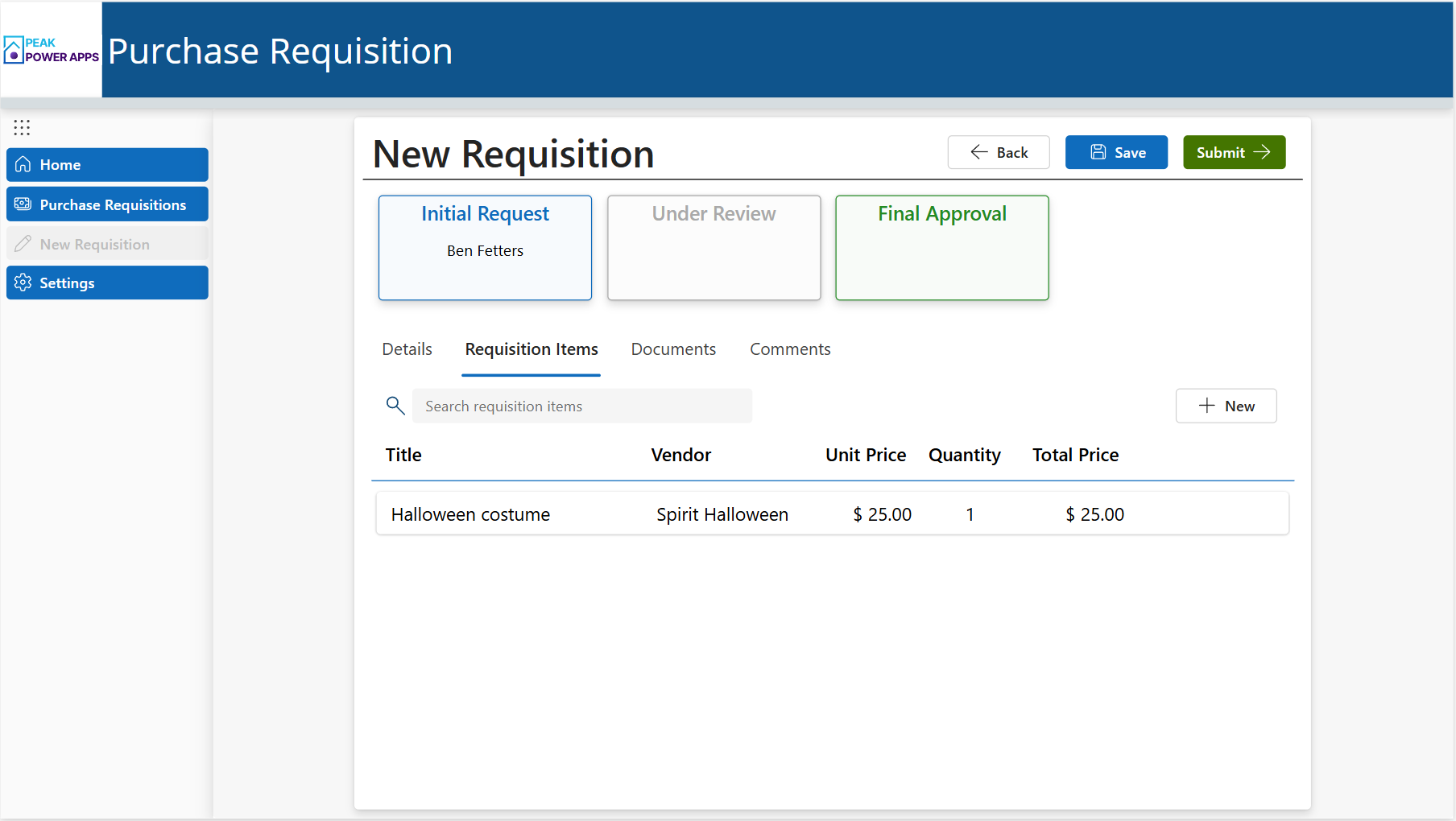
Build a tabbed form with a process flow, related items, and even a comments section. Save data effectively - including multiple techniques for saving multiple items at once.
Day 4 - Adding Complex Functionality and Formulas
Implement complex logic and formulas to approve/reject an item, save as a draft, data validation, and conditionally show/hide fields based on the user's role.
Day 5 - Manage, Share, and Publish your App like a Pro
Finally, we'll end with best practices for managing, sharing, publishing your app as we effectively create a solution, integrate environment variables, and setup a "pipeline".
You'll Walk Away With:
Your Very Own Advanced Canvas App
During the challenge, you'll build your very own advanced canvas app. This is tremendously helpful to use on future projects as well as a training reference to go back to after the challenge.
Confidence to Start Building Advanced Canvas Apps of Your Own
Confidence to start building your own advanced canvas apps comes as you TRULY understand the fundamentals of how canvas apps works - and how it doesn't.
Here's How it Works
WHEN
April 27th - May 1st
Live for 5 days, starts April 27th
2.5 hours of training and Q/A each day (9am MST - 11am MST)
WHO IS THIS FOR?
This challenge will be most effective for Canvas app makers that have built a basic app or two and are now ready to build an advanced, complex Canvas app solution.
In other words: this training is NOT for brand new beginners.
IS THERE Q & A?
Yes, after each 2-hour session for at least 30 minutes!
This is your chance to pick my brain and ask me any question you have about canvas apps
so you can skip all that time trying to find answers on your own.
SPOTS ARE LIMITED - ONLY 30 SEATS AVAILABLE!
To make sure students get plenty of time to ask questions and get the help they need
We're limiting the student count to 30
- so sign up before all the spots are taken!
IS IT RECORDED?
Yes.
You'll get access to the challenge recordings for 6 months!
- this lets you revisit each session in case you miss it or want to a refresher on what you learned.
Don't let this opportunity pass you by -> act fast!
DATE: Monday, April 27th - Friday May 1st
00
DAYS
00
HOURS
00
MINS
00
SECS
🔥BONUS: My Personal Canvas App Template
As a special gift to you, I'm including my personal Canvas app template I use on essentially every new project!
It's customizable, saves TONS of time, and it's all yours once the training is over.
If you don't want to build the app during the challenge, you can just use this.
Ready to Build an Advanced App?
Some of Our Clients



Testimonials
Melissa Vaughan
NASA
"Ben Fetters is an awesome instructor!
He was incredibly professional, knowledgeable, and patient.
He's a highly effective trainer that was able to explain Power Automate functionality, workflows, conditions, triggers, and the technical jargon in a way that was easy to understand at my level (beginner to intermediate).
Ben followed up immediately after the session with additional resources and information. I'll definitely be going back to [Peak Power Apps] for training and recommending to others!"

Boyd Davis
WEST POINT CITY
"[They're] awesome!
We have done some specialized training with them for Microsoft 365 products and apps. The training was very worthwhile and engaging.
Ben and Adam are so fun and personable. This was so much better than typical IT training.
Our employees went away excited about what they had learned and had many new ideas about how they could use the new products.
We would highly recommend [them] for your IT training needs!"
Previous Client
"Ben was excellent.
I needed some expert eyes to review some of my flows and he was able to quickly identify where I made a mistake and quickly correct it with me.
Very easy to work with. I will definitely work with Ben in the future. Great experience."
Frequently Asked Questions
Who is this challenge for?
Who is this challenge NOT for?
Will I really build an advanced app in 5 days?
Are the sessions recorded?
What's the challenge schedule?
Will there be a Q&A?
Stop Learning the Hard Way
YouTube and blogs are great.
But the problem with them is that they only show bits and pieces.
During this challenge, you'll get to see how it ALL comes together.
If you're ready, this challenge is the perfect way to start building fast, complex apps that actually work.
And to start feel confident doing it.
Join the Challenge00
DAYS
00
HOURS
00
MINS
00
SECS